
Software factory for small business: what it changes when you have one or two developers
What a software factory is, what it changes for a company with one or two developers, and how to start this week with one repository and one gate.

A software factory is a fixed, automated line that every code change passes through. AI agents write the code, then tests, security scans and a second reviewer check it before it can reach your customers. For a small or mid-sized company with at least one developer, that means custom software built around your own tools and process, with more checks on every change than most teams can run by hand.
Key takeaways
- It starts with you and an agent thinking the work through, before any code exists.
- A software factory turns one developer into the director of a whole production line.
- Security comes from gates that run on every change and refuse to pass bad work.
- AI code with no gates is risky. Veracode found a known flaw in 45% of its test cases.
- You can start with one repository, one gate and one real task this week.
I used to manage software development teams. Standups, sprint planning, the whole thing.
Today one person on my team is as productive as at minimum 50 engineers were three years ago.
That sounds made up until you watch it. In the last 30 days, the factory behind our own operating system landed about 370 pull requests on its main branch, and every merge had to pass a test suite that's now over 15,000 automated tests.
If you own a business with even one developer, this changes what you can afford to build.
What is a software factory?
Think of an assembly line for code. Work starts as a conversation with an agent and becomes a written request. An AI agent plans it and writes it. Automated stations check it. A person makes the calls that matter. What comes out the other end is a tested change, with a record of how it got there.
The stations are the point. They run the same way at 2pm on a Tuesday and 11pm on a Friday.
Here's what that gets a company your size:
1. Your developer stops being the bottleneck
Most small companies have a long list of software they'd like and one person who can build it. In a factory, that person directs the work and checks the results while agents do the typing. They spend their day on the decisions that took years to learn, like how the data should be shaped and what could go wrong.
2. The software fits your tools
You already pay for accounting, scheduling, email and a CRM. A factory can build the connections between them, in your own code, so you own the result.
3. Your process gets written down
Agents need instructions, so you write them. How you quote a job. Who approves a refund. What a finished feature has to do. Those rules live in plain files next to the code, and every agent reads them before it starts.
A useful side effect: the company now has its process on paper. It stays when someone leaves.
4. Security checks run on every change
This is the one I'd pay attention to.
Vulnerability exploitation is now the top way into a company. Verizon's 2026 Data Breach Investigations Report puts it at 31% of breaches, ahead of stolen credentials for the first time in the report's 19 years. The same report found the median time to fully patch a known-exploited vulnerability rose to 43 days, up from 32.
Now the catch: AI writing code with nobody checking makes this worse. In 2025, Veracode tested more than 100 models on 80 coding tasks, and they introduced a known security flaw in 45% of cases. Newer, larger models did no better.
So the protection comes from the line around the AI. Manual security depends on a busy person remembering. A gate either passes or it doesn't.
| Check | Small team working by hand | Software factory |
|---|---|---|
| Automated tests | When someone writes them | Required on every change |
| Code review | One colleague, if one has time | A second AI from a different company on anything risky, plus your developer |
| Vulnerable packages | Checked now and then | Scanned on every change and every day; high and critical findings fail the check |
| Passwords and API keys | A shared doc or a settings file | In 1Password, read when needed by an account limited to one vault |
| Secrets in code | Someone notices | A scanner blocks the commit |
| Security review | Often skipped under deadline | The AI reviewer checks each risky change, and a deep scan covers the whole codebase every month |
| Customer data separation | Trusted to memory | Automated checks fail the build |
| Going live | Whoever has access | Only a build that passed every gate |
5. Mistakes turn into permanent checks
When a person catches a bug by hand, the lesson lives in that person's head. In a factory, you turn it into a new automated check, and the same problem gets caught from then on.
Two real examples from our own line in late October. Our staging certification went red on a lead queue page. Dates on that page rendered one way on the server and another in the browser, so React threw the page away and rebuilt it. Nobody had reported it. That build stayed out of production, and we fixed the cause and added checks for it. The same week, an independent AI review flagged that a later record could overwrite a person's opt-out on our outreach system. We fixed it, with a test, before it merged.
Our own mistakes, caught by the line. That's what you're buying.
6. Patches stop waiting in a queue
Remember that 43-day number? Much of that delay is plain workload: someone has to read the advisory, update the package, test it and ship it. A factory can run that loop as routine work, so your developer reviews a tested fix and approves it.
7. You get a record
Every change leaves a trail: what was asked for, what changed, what was tested and who reviewed it. That's useful when a customer sends a security questionnaire, when your insurer asks how you handle code, and when you need to know why something works the way it does.
8. Several developers can share one codebase
Two developers in one codebase used to mean collisions and a lot of "don't touch that file yet." In a factory, every task gets its own branch and its own checkout, for people and agents alike, and everyone builds from the same written spec. The gates decide what merges. We run several agents against the same repository at once this way.
9. New features ship switched off
This one changed how I think about releases.
A finished feature goes to production behind a feature toggle, turned off. Your customers don't see it. The code is live, tested and sitting there, and you turn it on when the timing is right: after the training, after the announcement, for one customer first.
That lets the release run every night instead of bunching up into a big, scary launch day. Our nightly release agent holds the train if a new toggle tries to default to on without an approval, and it has no way to flip a toggle itself. Turning a feature on is a person's call. Turning it off again doesn't need a new release.
10. Passwords and keys live in a vault
Agents need keys to do their work, and that should make you a little nervous. So we keep ours in 1Password.
Each runtime gets its own 1Password service account, limited to one vault. An agent asks for a key by name when it needs it, so the key stays out of the code, and a scanner blocks the commit if one slips into a file. The vault our cloud agents use holds no production secrets. If one account goes bad, you cut off that account and everything else keeps working.
Rotating gets easier too. Each key lives in one place, so you change it once and everything reads the new value. Some of this already runs by itself: our QA sign-ins replace themselves 48 hours before they'd expire, and a new one has to pass a live identity check before it takes over. Keys from outside vendors still take a person, because every vendor does it differently. We're also still moving our older settings files into the vault.
Developers get access up to staging. Merging code deploys to staging, and that's where people and agents test. Production goes through the nightly release line, on a build that passed certification, or through a hotfix I authorize. Our fixer agent gets even less: it runs in its own locked-down account with no keys at all, and a health check proves it can't read them before it's allowed to start.
The vault helps QA as well. Agents test signed in, the way a real user would, and our certification signs in as seven staging identities on every run. A test agent can pull a staging login from 1Password when the test starts, including the one-time code if the account uses two-factor, so no password sits in a test file. Moving those QA logins into the vault is our next step.
Start by thinking it through with the agent
If I could change one habit for owners trying this, it'd be this one. Talk the idea through with an agent before asking it for anything.
An agent will happily build exactly what you asked for, including the parts you didn't think through. So we built a skill called grill-me, based on Matt Pocock's "grill me" prompt. It flips the conversation around: the agent interviews you.
It reads your code and documents first, so it only asks what it can't find out on its own. Then it asks three to five questions at a time, each with the answer it recommends, so you can reply from your phone with "1 yes, 2 your pick, 3 only for Cinch." It keeps going until there are no gaps left. Sometimes that's 5 questions and sometimes it's 30.
This is where the good ideas show up. It asks about the customer you forgot and the edge case you skipped, and it'll suggest a simpler way to do the thing. After every answer it saves its notes: what you decided, why, and what's still open. A long session can't drift, and you finish with requirements you can check the work against.
A few questions now cost far less than rebuilding the wrong thing later.
How the work gets planned
Once the interview is done, the answers become documents, in order:
- BRD (business requirements document): what the business needs and why.
- PRD (product requirements document): what the software has to do, and how you'll know it's done.
- Architecture blueprint: how it will be built, and which decisions are locked.
I like to have my business process mapped out in Excalidraw. The agents draw the map, and I look at it and make sure everything looks correct. A wrong step is easy to spot in a picture, and cheap to fix before anyone builds it.
Design gets its own station
Agent-built software has a reputation for looking generic. We built our Rincon mockup skill to deal with that. For each new screen, it lays out two or three different directions as clickable pages. A design review scores each one against a written quality bar before anyone outside sees it. After the build, the agent captures signed-in screenshots of the real screen, compares them with the approved mockup, and proves every button works with a test.
The design that comes out of it has been really strong. This website went through the same process.
For images and video, agents use Higgsfield. The images on this post came from it.
Where the documents and conversations live
We use Notion for document storage and for how agents and people work together. BRDs, blueprints, approvals and messages all sit there, so I can read what an agent decided and answer in the same place.
I've done the same with Microsoft Azure DevOps and SharePoint, so a Microsoft shop can keep the tools it has.
Here's the line with both options:
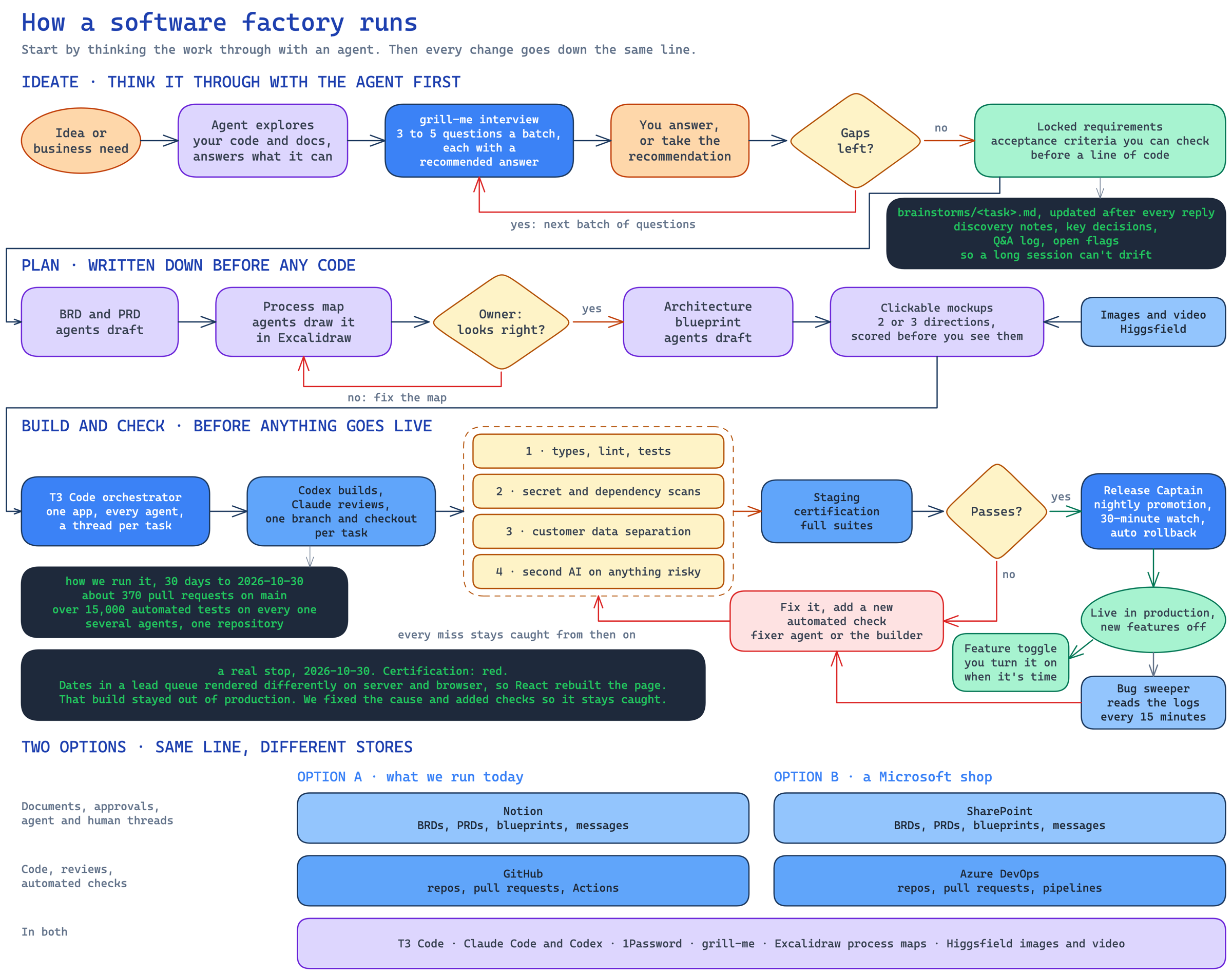
How our factory got here
We didn't start with any of this. Here's how it grew, and the tools at each stage.
- April 2026, agent builds and humans test: I started our operating system with Claude Code, Codex, Next.js, Supabase, Clerk, LightRag and AWS Amplify. I checked and released the work by hand.
- May, a process: hooks, skills and a documented development process, git worktrees so several agents could work at once, and Codex reviewing Claude's work.
- July, risk and cost: risk lanes, so a low risk change doesn't get the same treatment as a login change, and a model ladder that sends simpler work to cheaper models like GLM.
- September, agents ship: builders merge their own work once the required checks pass. A Mac runner certifies staging around the clock on GitHub Actions. A Release Captain agent promotes the certified build each night, watches it for 30 minutes and rolls back on its own. If nothing's certified, it holds.
- Early October, the line watches itself: a bug sweeper reads the logs every 15 minutes, a fixer agent works on failures from a sandboxed account, and a dispatcher picks up ready work from Notion. The fixer is the newest piece and still proving itself. This week we found a sandbox setting that kept it from committing any fix, so we fixed that.
- Late October, T3 Code: the whole team moved into one agent orchestrator.
T3 Code is the biggest recent change. It's a free, open-source app from Theo Browne and his team that runs coding agents from different companies in one place. Each of our agents has its own thread. A lead hands a build to Codex in its own git worktree, Claude reviews the result, and T3 watches the pull request and wakes the lead when checks pass or someone comments. Daily routines run on its scheduler, and when an agent needs a decision from me, the question lands in one pinned thread.
We send each model what it's best at. Today Codex does the building and Claude does the design and review. We're starting to incorporate Antigravity into our mockup process. GLM is being used for automated processes and we'll experiment in the future for other tasks.
Where humans still decide
A few calls belong to humans. You decide what gets built and what the gates require. Your developer reviews what matters. Anything that moves money, changes who can log in, touches production data or reaches a customer for the first time waits for a person.
If I were starting this week
- Pick one repository your developer already maintains.
- Turn on required tests and a dependency scan, so a failure stops the merge.
- Write a one-page rules file: how you work, what's off limits, what done means.
- Pick one small real task and have an agent interview you about it until it has no questions left.
- Let it build the task and go through the gates, behind a toggle.
- Each time something slips through, add a check for it.
You'll know within a week whether your developer wants more of it.
FAQ
Is AI-written code secure? On its own, often it isn't. Veracode found known flaws in 45% of its test cases. Code that has passed tests, security scans and independent review before release is a different thing, and that's what the factory gives you.
Do I need a developer on staff? It helps, because someone should own the rules and review the results. If you don't have one, a partner can run the factory for you and hand you the code.
Will this replace my developer? Their job changes. They spend less time typing and more time deciding, and the same person can take on far more of your list.
Can it work with the code and tools we already have? Yes. Most factories start on an existing repository and connect to your current systems through their APIs. Very old systems with no API take more work.
What does it cost? It depends on what you build. We set our price at about a tenth of the first-year savings we project from where your hours go today, and you see that projection before you decide.
We build software this way for small and mid-sized companies, and you can read how on our software factory page. If you'd like to see it on your own work, your first automation is at no cost.
Sources: Verizon 2026 DBIR, Tenable's DBIR summary for the patching numbers, Veracode 2025 GenAI Code Security Report.

Start with one AI automation. Unfold the whole company operating system.
AI operating systems and automations for businesses.
Start free: an AI audit day or your first automation.

Written by Jonathan Cavner
Founder, Rincon AI
Jonathan Cavner founded Rincon AI in Tucson after more than two decades building identity, portal and payments systems in regulated financial services.
More from the Blog
 AI training for employees: build the class around the workHow to build AI training for employees around one real task per role: data rules, a prompt and review pattern, the right format and how to measure it.Oct 29, 2026 6 min read
 Everything a small business owner should know about AI document processingWhat AI document processing reads, where it enters the data, which documents to start with, what it costs, and the questions to ask first.Oct 23, 2026 6 min read